Thursday, 19 July 2012

Lightswitch: Get multi-selected items from DataGrid

This allows you to access all the selected items in the grid instead of just one (the SelectedItem property)
private const string Grid = "gridname";
private DataGrid _gridControl = null;
partial void Screen_InitializeDataWorkspace(List<IDataService> saveChangesTo)
{
    
this.FindControl(Grid).ControlAvailable +=
new EventHandler<ControlAvailableEventArgs
>(Grid_ControlAvailable);

}
void Grid_ControlAvailable(object sender, ControlAvailableEventArgs e)
{
_gridControl = e.Control
as DataGrid
;

if (_gridControl != null
)
_gridControl .SelectionMode =
DataGridSelectionMode.Extended;
}
partial void SomeAction_Execute()
{    
foreach (ObjectName e in
_gridControl.SelectedItems)     {         ...   
}

}

Lightswitch: Get choice value of a property

I have found quite a number of things from the internet when I was doing my Lightswitch development, but I cannot remember most of the source now. So thanks for people in the community who have contributed but sorry I cannot acknowledge them properly.


Here is an extension method for getting the choice value of a property in code:

public static string GetDisplayedChoiceValue(this IEntityStorageProperty property)
{
// If the value is null, it has no display value
if (null == property.Value)
return null;

string valueAsString = property.Value.ToString();
// Get the list of choices for this property
IEnumerable<ISupportedValueAttribute> choices = property.
GetModel().Attributes.OfType<ISupportedValueAttribute>();
// Find the choice that matches the property value
ISupportedValueAttribute choice = choices.Single(
c => String.Equals(c.Value, valueAsString, StringComparison.Ordinal));

// If the choice does not have a display name, return the choice value instead
if (String.IsNullOrEmpty(choice.DisplayName))
return choice.Value;
else
return choice.DisplayName;
}

To use it with your object:

CodeName = o.Details.Properties.Code.GetDisplayedChoiceValue(),

Wednesday, 29 February 2012

Job Ad.

Actually, not just Graduate Software Developers we are looking for, but Intermediate, Senior… whoever interested…

clip_image002

Tuesday, 6 December 2011

Ellerslie .NET User Group Website is revived!

http://ellerslieusergroup.net.nz/

image

Ellerslie .NET User Group 22/12/2011 C# 5.0

Hello everyone,

After 9 months pregnancy and 2 months learning to be a mum, I am back and yes, Ellerslie .NET User Group is time to revive! Right before Christmas and Christmas holiday we will have a talk about C# 5.0 by Alex Davies, Software Engineer at Olympic Software. Hope we can meet up after not seeing each other for so long! A good geeky event right before the holiday season! Yay!

Again, really look forward to meet you all, register to let me know aye!

Date: 22nd December 2011 Thursday

Same time, same place. which is...

Gather at 5:45pm, starting at 6:00pm
Catering: Pizza & Drinks
Door Charge: Free!
Venue: Olympic Software, 10 Cawley Street, Ellerslie, Auckland (find a map here)

Register here: jacqc@olympic.co.nz

Title: C# 5.0

C# 5.0 brings two new keywords to assist in writing responsive asynchronous applications. We will have a look at the existing problems of synchronous code and how we can utilize the new language features to improve your applications to make them respond faster and perform better.

Speaker: Alex Davies, Software Engineer at Olympic Software NZ Ltd

Cheers,

Jacqualine Chow
Business Development Evangelist

DDI: 09 980 3999

Mobile: 029 770 0999

www.olympic.co.nz

Thursday, 27 January 2011

What if Visual Studio had Achievements?

From http://blog.whiletrue.com/2011/01/what-if-visual-studio-had-achievements/ Author: rudi

What if Visual Studio supported achievements, just like games on Steam, Xbox or PS3? Bragging to your coworkers about which one you’ve just unlocked, imagine that! Here’s a little proposed list for some of them. .NET / C# flavored, of course.

  • Falling Down – Created a new SharePoint project
  • Job Security – Written a LINQ query with over 30 lines of code
  • The Sword Fighter – 5 Consecutive Solution Rebuilds with zero code changes
  • Shotgun Debugging – 5 Consecutive Solution Rebuilds with a single character change
  • The Mathematician – Defined 15 local variables with a single character name
  • The Academic – Written 1000 lines of F#
  • Spaghetti Monster – Written a single line with more than 300 characters
  • Wild One – Mixed tabs and spaces for indentation more than 5 times in a single line
  • The Organizer – Created a Solution with more than 50 projects
  • The Portal – Created a circular project dependency
  • The Multitasker – Have more than 50 source files open at the same time
  • The Code Keeper – Uninstalled Resharper because it made you redundant
  • Pasta Chef – Created a class with more than 100 fields, properties or methods
  • Procedural Programmer – Created a method with more than 10 out parameters
  • Steam Powered – Added Visual Studio as a Steam game
  • The Poet – Written a source file with more than 10,000 lines
  • The Enterprise – Build Solution took more than 10 minutes
  • Highway to Hell – Successfully created a WCF service
  • The Explainer – Written a comment with more than 100 words
  • TPS Reports – Created a Crystal Reports Project
  • Rage Quit – ALT+F4 after a failed bug fix
  • Ooooh Shiny – Written 100 extensions methods
  • Look Ma – Written an infinite Fibonacci generator using yield
  • The Engineer – Killed a zombie with The Wrench
  • The Architect – Created 25 Interfaces in a single project
  • The Right Way – Test method is longer than the tested method
  • The Defender – Checked every argument for null exceptions
  • Pokemon Programming – Caught all the exceptions
  • Black Magic – Implemented a RealProxy
  • Gimme back my ASM – Used ILGenerator
  • I’m Sorry – Created a new Visual Basic Project
  • The SEO Expert – ASP.NET MVC Routing table with more than 100 routes
  • The Matrix – Windows Forms with more than 100 controls
  • The Daredevil – UpdatePanels nested more than 3 layers deep
  • Just a Test – Nested multiline C-style comments that caused a compilation error
  • Warm Bath – Successfully consumed a non .NET SOAP web service
  • Old School – Defined more than 100 static objects
  • The Cloner – Copy-pasted more than 50 lines
  • The Dependency – Referenced more than 30 projects
  • Paying the bills – Imported a Visual Basic project
  • First Hit – Included a Codeproject.com library into your project and it actually compiled
  • Paula – Define a firstname field with value Brillant
  • Every Option Considered – Created an enum with more than 30 values

Inspired by Steam Holiday sales and Battlefield Bad Company 2. Odd web coding exposed on the mostminimalistic company page possible. Enjoy.

Tuesday, 9 November 2010

Ellerslie .NET User group 17/10/2010

Hello everybody! Haven’t contact you all for so long! It’s my bad, too much happened in the last half a year. Anyway, here Ellerslie User Group is, we are starting up again!

Date: 17th November 2010 Wednesday.

Same time, same place. which is...

Gather at 5:45pm, starting at 6:00pm
Catering: Pizza & Drinks
Door Charge: Free!
Venue: Olympic Software, 10 Cawley Street, Ellerslie, Auckland (find a map here)

Register here: register@ellerslieusergroup.net.nz

Join us at your Ellerslie for the Tech.Ed 2010 Express Roadshow presented by Ryan Tarak (http://blogs.msdn.com/b/nzstudents/). We will demonstrate how you can leverage your existing skills to build applications for the Windows Phone platform, hear about the next release of Internet Explorer and much more. In addition to the exciting technology demos, we will have giveaways and prizes to be won also.

Hope to catch up with you all on the day, so please register and come!  (Come on the day even you didn’t register though, haha)

Cheers,

Jacqui

Olympic Software NZ Ltd - We are Hiring!

Olympic Software is looking for new blood! We are hiring graduated software engineers and computer scientists who are smart and enthusiastic and devoted.
What we would love to see in you:
  • Interested in solving problems
  • Love to learn
  • Stand up to challenges
  • Team player
  • Willing to communicate
  • Customer focused
As a medium size company we employ wide range of technologies in delivering variety of solutions of different sizes. Some commonly used technologies/languages include
  • MVC
  • AJAX
  • JavaScript
  • jQuery
  • ASP.NET/C#
  • SharePoint
  • Microsoft Dynamics
  • MSSQL
  • MS Office Integrations
  • etc…
You will experience a lot working with us the Software Engineering team.
If you would like to join us please send your CV to jacqc@olympic.co.nz to apply.
And check us out on Facebook!

Jacqualine Chow
Business Development Evangelist | Olympic Software NZ Ltd | 10 Cawley Street, Ellerslie, Auckland, New Zealand | DDI +64 9 9803999 | Mobile +64 29 770 0999 | jacqc@olympic.co.nz

Thursday, 10 September 2009

Popup appears under flash file

image001

If your popup (e.g. menu) appears under a flash file in FireFox, try wmode=”transparent” for the embed (or as a param for object), and I think the bgcolor attribute does make the difference too.

Updated Code Camp time table – 3 days to go!

http://www.hack-ed.com/Event/Event.aspx?EventID=cb9e96a5-7a1a-4774-ac03-b2d0aa2c2954

.NET Development

Introduction and Welcome

10:00-10:15

What's Happening in .NET Languages, and Why Should You Care?

10:20-11:20

Behaviour Driven Development

11:25-12:25

C# 4.0

12:30-12:40

Lightning Talks

12:40-13:00

Lunch - Development

13:00-13:40

Becoming Certified

13:05-13:35

Domain Specific Languages

13:40-14:40

Silverlight with Prism

14:45-15:45

.NET on the iPhone and Beyond

15:50-16:50

Wrap-up, prizes, etc

16:50-17:00

Security

Introduction and Welcome

10:00-10:15

Security SDL / Threat Modelling Workshop

10:20-13:00

Lunch - Security

13:00-13:40

What's New in ForeFront 2010?

13:05-13:35

Secure Coding Practices

13:40-14:40

Wrap-up, prizes, etc

16:50-17:00

SQL Server

Introduction and Welcome

10:00-10:15

SQL Server Virtualisation Best Practices; Query Optimisation and Query Tuning; SSAS and Gemini

10:20-13:00

SQL Panel / Q&A

13:05-13:35

Lunch - SQL

13:40-14:40

Understanding SQL Indexing

14:45-15:45

SQL Server Maintenance

15:50-16:50

Wrap-up, prizes, etc

16:50-17:00

Monday, 31 August 2009

Code Camp Auckland 2009 - Development | SQL | Security

Code Camp Auckland on the 13th September 2009!

If you want to catch some free sessions on the state-of-the-art in .NET development, SQL Server and developer security then sign up for Code Camp Auckland 2009 now.

Code Camps are non-profit, and organised by members of the local developer community. This year the Auckland Code Camp is the day before TechEd (Sunday 13 September), so we've managed to nab a few great speakers on their day off to present to us.

It's the biggest Code Camp ever - over 14 hours of sessions across 3 streams from 10am till 5pm:

Development...

  • What's Happening in .NET Languages and Why Should You Care?
  • Behaviour Driven Development
  • Domain Specific Languages
  • C# 4.0 new features
  • Silverlight with Prism
  • .NET on the iPhone
  • Becoming Certified
  • Lightning Talks
  • and more!

The latest and greatest in development topics, by the people that know!

SQL Server?

  • SQL Server Virtualisation Best Practices and Recommendations
  • SQL Server Analysis Services and Gemini
  • Query Optimization and Query Tuning
  • Understanding SQL Server Indexing
  • SQL Server Maintenance

Training and guidance from the best SQL trainers in the industry!

Security!

  • Secure Development Lifecycle and Threat Modelling workshop
  • Secure Coding Practices

timetable

We are lucky to have Michael Howard, author of Writing Secure Code and 24 Deadly Sins of Software Security giving a free workshop for developers, architects and team leads on Threat Modelling and the Secure Development Lifecycle. This will be followed by a session on how to write secure .NET code.

Auckland has never seen such an awesome free event!

Presenters that are offering their time include Greg Low, Nicholas Dritsas and Auckland's Alex Henderson of Architecture Chat fame.

To cover the costs of the event, we have the help of our generous sponsors: Microsoft, Datacom, Intergen, INETA and Xero.

All that's left for you to do is to visit the website for more details, and sign up now!


P.S. Location! Of coz!

We have three rooms at the Crowne Plaza Hotel in Auckland, which is across the road from TechEd:

http://www.ichotelsgroup.com/h/d/cp/1/en/hotel/aklnz

128 ALBERT STREET PO BOX 6841
AUCKLAND, 1030 NEW ZEALAND

Wednesday, 1 April 2009

GO! Recorder is released

http://store.olympic.co.nz/

GO! Recorder is a tool we built for tracking work time quickly and easily. It’s now released to the market! Download a free 30-day trial to check it out!

GO! Recorder

5 GREAT REASONS TO PURCHASE GO! RECORDER

1. Make better use of your time:
GO! Recorder automates time recording so you can get on with your work instead of filling out timesheets.

2. Start using it in seconds:
GO! Recorder is incredibly quick and intuitive to learn, so you’ll have it up and running in no time.

3. Really understand where your time goes:
GO! Recorder’s realtime recording creates 100% accuracy around how long you’re spending on each task.

4. Stop searching for job codes:
GO! Recorder gives you a simple-to-set-up list of job favourites to make your life even easier.

5. Simplify client billing:
GO! Recorder tracks the exact amount of time you’ve spent on each client’s job, which makes billing them later a breeze.

Thursday, 16 October 2008

Guest Lecture: Emerging Technologies covering database

I had done a guest lecture for INFOSYS330 in University of Auckland this afternoon. It was good... I think? Usually in the second last week of the semester there are not many students attending class, but this lecture marks attendance, so nearly everyone come to lecture, ha-ha. That made me feel better. :D

Anyway, just want to put up some slides and code. 

Here: slides and codes


P.S. I have polygon data for NZ map - and yes, I traced it. :P

Tuesday, 7 October 2008

Facebook speaks Pirate!

Tim from the Auckland University told me about this today! Wow! Didn't know that Facebook can speak Pirate English!

image

image

Friday, 3 October 2008

Imagine Cup 2009

clip_image002

http://www.microsoft.com/nz/imaginecup09/

Yes! Imagine Cup – “The world’s premier student technology competition” – is here again! This year we are going to mentor a team. Which one? I have no idea yet, haha. I am very excited about this event and mentoring. :)

If your company wants to mentor a team as well, please email icnz@microsoft.com. Look forward to have our team competing with yours! :P

Friday, 26 September 2008

Annoying VS2008 System.Runtime.InteropServices.COMException

I was a bit annoyed, and whatever people say in here didn’t solve my problem. >_<

If you got this when you open a Web services project:

image

Run your Visual Studio as an administrator (in Vista, in order to access IIS metabase)!

Friday, 19 September 2008

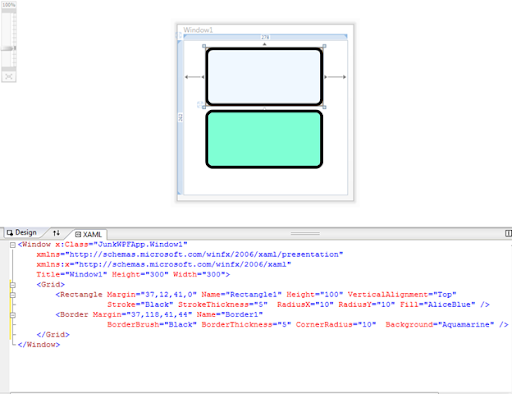
XAML: Diff between Rectangle and Border?

image

So here we are, a rectangle and a border with curved corners. Hmmm, what are the differences between them? Why different property names and API? Maybe I am too dumb to discover. Can someone please let me know?

XAML: Curved Corner Rectangle *Update

Simple. <Rectangle /> cannot have curved corner.* If you want a curved corner filled rectangle, use <Border />.

* Ivan told me that, actually you can! Check out the RadiusX and RadiusY properties!

Example:

<Border x:Name="ShapeBorder" Height="25" Background="Aqua" CornerRadius="3"
BorderThickness="1" BorderBrush="Black" />

The key attribute is CornerRadius! :)


image

Thursday, 11 September 2008

Demonstrate Drag and Drop from ListBox to ListBox in WPF

Still haven't be able to created the memory leak problem.

I have implemented simple drag and drop from one ListBox to another ListBox onto my memory leak test project. The power of WPF, all I did was create an adorner for visualising drag and drop, and remove/add object from/to the data binding sources.

By the way, no guarantee to be bug-free because implementing drag and drop logic was not my intention. I am trying to find out the memory leak problem!

Download

Anyway, let me note some key points:

1. A Canvas encapsulating the ListBoxes (in ShapeListCollectionControl.xaml)

<Canvas HorizontalAlignment="Stretch" VerticalAlignment="Stretch" Name="TestCanvas"
DragOver="TestCanvas_DragOver">
    <ListBox Width="300" Margin="0,0,0,0" Name="TestListBox"
PreviewMouseLeftButtonDown="TestListBox_PreviewMouseLeftButtonDown"
AllowDrop="True" Drop="TestListBox_Drop"
GiveFeedback="TestListBox_GiveFeedback">
<ListBox.ItemTemplate>
<DataTemplate>
<main:ShapeListControl ListID="{Binding Path=ListID}"
HorizontalContentAlignment="Stretch" VerticalContentAlignment="Stretch" />
</DataTemplate>
</ListBox.ItemTemplate>
</ListBox>
</Canvas>

Don't worry about the event handlers yet. Having a canvas as a wrapper allow you to add adorner to the canvas when you start dragging.

2. Start dragging - TestListBox_PreviewMouseLeftButtonDown (in ShapeListCollectionControl.xaml.cs)
Note that I didn't write the GetObjectDataFromPoint method, I didn't even find it. All I have done was made it into an extension method.

Anyway. So the PreviewMouseLeftButtonDown event handler does the following:

i. Find out what has been dragged
ii. Find out the object list
iii. Set the selected shape
iv. Create Adorner and add to the canvas
v. Remember the offset positions
vi. Start dragging

3. Dragging - TestCanvas_DragOver
Note that here I am dragging the adorner, NOT the actual control. And it is in the canvas, not the ListBox!

4. Dropping - TestCanvas_Drop
To drop the selected shape, find the ShapeList by drop position. In the data model, remove the shape from the list we drag from and add to the list we drop to. After that remove adorner and reset selection.

object data = TestListBox.GetObjectDataFromPoint(position);

if (!(data is ShapeList))
{
RemoveAdorner();
return;
}

ShapeList list = data as ShapeList;

// Change Data
if (Manager.FromList != null)
{
Shape s = Manager.SelectedShapeControl.Shape;
Manager.FromList.Remove(s);
list.Add(s);
}